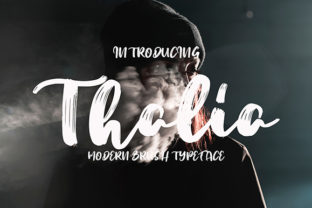
Thalia: A Bold Handwritten Font for Web Design
In the crowded digital landscape, typography is often the first element that communicates brand personality before a user even reads a single word of copy. As web designers and UI creators, we constantly balance aesthetic appeal with functional clarity. Thalia emerges as a compelling solution in this space, offering a modern and bold handwritten character that bridges the gap between authentic human touch and professional digital presentation. This typeface is not merely decorative; it is a strategic design asset for creating memorable online experiences.
Understanding the Visual Personality of Thalia
Thalia belongs to the category of script fonts, but it distinguishes itself from traditional calligraphy by embracing a contemporary, assertive stroke weight. Unlike delicate scripts that can vanish on mobile screens or get lost against complex backgrounds, Thalia commands attention. Its authentic twist comes from irregularities that mimic natural handwriting, preventing the sterile feel often associated with automated digital type. For a web designer, this means you can inject warmth and humanity into a layout without sacrificing legibility.
The boldness of this font makes it particularly effective for establishing visual hierarchy. In web design, hierarchy guides the user’s eye through content. By using Thalia for primary headings or hero section titles, you create an immediate focal point. It signals importance and emotion, encouraging users to pause and engage with the core message of a landing page or product banner.
Strategic Applications in Digital Layouts
When integrating Thalia into your design system, context is crucial. This font shines brightest in display roles. It is ideal for hero sections on SaaS landing pages, where you need to convey innovation and approachability simultaneously. Consider a coaching website or a creative portfolio; here, Thalia can serve as the headline typeface, drawing visitors in with its confident flair while the body text remains clean and readable.
- Hero Headers: Use large sizes to create impact above the fold.
- Call-to-Action Buttons: Short phrases like "Join Now" or "Get Started" gain personality when rendered in Thalia.
- Section Dividers: Break up long-scrolling pages with bold, handwritten subheads.
- Digital Ads: Capture attention quickly in social media graphics and banner ads.
However, restraint is key. Using a bold handwritten font for long paragraphs or dense information blocks can cause fatigue. Thalia is best reserved for short phrases, logos, and accent elements. For body copy, always pair it with a highly legible sans serif font or a neutral serif font. This contrast ensures that while the brand voice feels unique, the reading experience remains effortless.
Enhancing Brand Identity and Trust
Brand identity extends beyond colors and logos; it encompasses the tone of voice conveyed through typography. Thalia supports brands that wish to appear authentic, bold, and modern. For boutique online stores, this font can elevate product packaging designs and website banners, suggesting a handcrafted quality. For digital product creators, it adds a personal touch to course sales pages, making the offer feel more curated and less transactional.
Consistency across platforms strengthens brand recognition. When you use Thalia in your web design, ensure it aligns with your social media graphics and email headers. This cohesive visual language builds trust. Users subconsciously associate consistent, high-quality typography with professionalism and reliability. A disjointed typographic strategy, conversely, can signal amateurism.
Readability and Responsive Design Considerations
One of the biggest challenges with script fonts is maintaining readability on small screens. Thalia’s bold structure helps mitigate this issue, but careful implementation is still required. On mobile devices, avoid using Thalia at sizes below 24px for headings. Ensure sufficient line height to prevent ascenders and descenders from colliding, which can clutter the visual field.
Contrast is another critical factor. Thalia performs well on both light and dark backgrounds, provided there is adequate contrast. When placing text over image overlays, use a solid or semi-transparent backdrop to ensure the intricate details of the handwritten strokes remain clear. Avoid placing Thalia over busy textures or low-contrast images, as this can render the text illegible and frustrate users.
Font Pairing for Modern Typography
Successful web design relies on harmonious font pairing. Since Thalia is a dominant display font, it requires a supportive partner for body text. A clean, geometric sans serif font works exceptionally well, providing a modern counterpoint to Thalia’s organic curves. This combination is popular in editorial design and tech-focused websites because it balances creativity with clarity.
Alternatively, pairing Thalia with a classic serif font can create a sophisticated, editorial aesthetic suitable for lifestyle blogs or luxury e-commerce sites. The serif adds tradition and stability, while Thalia injects energy and modernity. Experiment with weights and styles to find the right balance for your specific project. Always test these pairings across different devices to ensure they maintain their visual harmony in responsive layouts.
Licensing and Technical Implementation
Before deploying Thalia on client projects or commercial websites, verify the licensing terms. Most premium fonts require specific licenses for web use, often involving webfont files or services. Ensure you have the correct commercial font license for online stores, landing pages, and digital templates. Check if the font package includes various weights, alternates, and multilingual support to accommodate diverse audiences.
From a technical standpoint, optimize font loading to prevent performance issues. Use variable fonts if available, or subset the font files to reduce load times. Fast-loading typography contributes to better user experience and SEO rankings. By treating Thalia as a core component of your design assets, you ensure that your digital products not only look stunning but also perform efficiently.
Incorporating Thalia into your toolkit allows you to move beyond generic templates. It offers a way to infuse personality into every pixel, creating web experiences that resonate emotionally with users. Whether you are designing a minimalist portfolio or a vibrant online store, this bold handwritten font provides the authentic twist needed to stand out in a saturated digital market.